
Looking for a symptom tracker for chronic illness? Learn what to track, how to spot patterns, and how an interactive dashboard can help you prepare for doctor visits.
Medical disclaimer: This article is for general education and personal organization only. It is not medical advice and does not diagnose, treat, or cure any condition. Always talk to your doctor (or GP, if you are in the UK) about your symptoms and treatment.
Living with a chronic illness often means living with questions. Why was today so much harder than yesterday? Did that poor night of sleep make the fatigue worse? Is the headache connected to stress, caffeine, or something else entirely?
When symptoms come and go, memory is not a reliable guide. A symptom tracker for chronic illness gives you something better: a clear record of what you felt, when you felt it, and what else was happening in your day. Over time, that record can help you notice patterns and have more useful conversations with your healthcare team.
In this guide, you will learn what to track, how to read your data without jumping to conclusions, how to compare tracking methods, and how to bring your notes to a doctor or GP appointment.
Why Tracking Symptoms Matters When You Have a Chronic Illness
Chronic symptoms rarely follow a neat schedule. Fatigue, joint pain, brain fog, digestive discomfort, and mood changes can shift from hour to hour and day to day. Because of that, it is easy to forget details or to remember only the worst days.
Starting Monday… again?
Stop Quitting by Week 2. Finish Your 90 Days.
- ✗ Start strong, then forget to log and lose all momentum
- ✗ Habits, workouts, water & sleep scattered across 5 apps and notes
- ✗ Paying monthly subscriptions for apps you stop opening
- ✗ Working out for weeks with zero proof of progress
The fix: one private dashboard with a daily progress ring, streaks, charts and 16 badges that make you want to come back tomorrow.
Start My 90-Day Streak – Only $19 →
- ⚡ Instant HTML download
- 🔒 Private, saved in your browser
- 📴 Works offline
- 💳 One-time payment, no subscription
A consistent symptom log can help you:
- See the bigger picture. Daily ups and downs make more sense when you view them across weeks instead of one day at a time.
- Notice possible patterns. You might see that symptoms tend to appear after short sleep, high stress, or a heavy caffeine day.
- Give your doctor better information. Saying “I have been tired a lot” is helpful. Showing a month of 1–10 severity scores alongside sleep and stress notes is far more specific.
- Feel more in control. Tracking turns a vague, frustrating experience into something you can look at and learn from.
Tracking does not replace medical care. It supports it by giving you and your healthcare provider clearer information to work with.
What Should You Track in a Symptom Tracker?
The best tracker is one you will actually use every day, so start simple. Most people benefit from recording two types of information.
1. Your symptoms
Log each symptom you want to understand, along with a severity score from 1 to 10. Common examples include:
- Fatigue and low energy
- Headaches
- Joint pain or stiffness
- Brain fog
- Bloating and digestive discomfort
- Mood changes
- Skin flare-ups
A numeric scale matters because “bad” means different things on different days. A 1–10 score lets you compare a rough week with a better one.
2. Daily factors that might be connected
This is where patterns start to show up. Alongside symptoms, record everyday factors such as:
- Sleep: hours slept and how rested you felt
- Water intake: how much you drank
- Fiber: a rough sense of how much fiber you ate
- Stress: a 1–10 rating for the day
- Exercise: whether you moved and how much
- Caffeine: cups of coffee, tea, or energy drinks
You do not need to track everything forever. Many people begin with three or four factors, then add more once logging becomes a habit.
Paper vs. Apps vs. an Interactive Dashboard
There is no single right way to track symptoms. Here is how the common options compare.
| Method | Strengths | Limitations |
|---|---|---|
| Paper journal or printable | Cheap, flexible, no technology needed | No automatic pattern analysis; hard to compare weeks; easy to lose |
| Phone apps | Reminders, quick entry | Often subscription-based; data may be stored on company servers; ads or upsells are common |
| Spreadsheet | Fully customizable | Requires setup and formulas; not designed for symptom tracking |
| Interactive HTML dashboard | One-time purchase, works in your browser, built-in charts and pattern views | Data is stored in your browser, so you should keep your device and browser data safe |
If you want automatic pattern spotting without monthly fees, an interactive dashboard can be a strong middle ground between a paper journal and a full app.
How to Track Symptoms Step by Step
Follow this simple routine to build a log you can trust.
- Pick your top 3 to 5 symptoms. Tracking too much at once leads to burnout.
- Choose the daily factors to log. Start with sleep, stress, and one or two others.
- Log at the same time every day. Evening works well for many people because you can review the whole day.
- Use the same 1–10 scale every time. Consistency matters more than perfection.
- Note unusual events. Illness, travel, a medication change, or a very stressful day all affect your data.
- Track for at least two to four weeks before drawing conclusions. A few days of data is not enough to see anything reliable.
- Review weekly. Look for what tends to show up on your harder days and your easier ones.
How to Read Your Data Without Jumping to Conclusions
This step is the most important and the most often misunderstood.
A pattern in your log shows that two things appear together. It does not prove that one causes the other. For example, you might notice that high-symptom days often follow nights of poor sleep. That is a useful observation to share with your doctor, but it is not proof that sleep is the cause.
Keep these guidelines in mind:
- Look for repeated patterns, not one-off coincidences.
- Change one thing at a time when you experiment, and only with your healthcare provider’s guidance for anything medical.
- Do not stop or change medication based on your tracker.
- Remember that other factors may be missing from your log.
Think of your tracker as a way to ask better questions, not to diagnose yourself.
How to Share Your Symptom Log With Your Doctor or GP
Appointments are short, and it is hard to recall weeks of symptoms on the spot. Your tracking history can make the visit more productive. Before your appointment:
- Summarize the main trend in one or two sentences (for example, “Fatigue has averaged 7 out of 10 over the last three weeks”).
- List your top three questions so you do not forget them.
- Note any patterns you noticed, and describe them as observations rather than conclusions.
- Mention changes in sleep, stress, diet, exercise, or medication.
- Bring a screenshot, printout, or the device itself so your doctor or GP can see the timeline.
Whether you call it a doctor’s appointment (US) or a GP visit (UK), clear records help your provider understand what you are experiencing.
Common Chronic Illness Symptoms and How to Log Them
People living with long-term health conditions describe very different experiences, but several symptoms come up again and again. Reputable health organizations such as the NHS and the CDC publish general information on living with long-term conditions, and tracking is a common self-management habit they discuss. Here is how to log the symptoms people most often want to understand.
Fatigue and low energy
Fatigue is more than feeling tired. Rate your energy from 1 to 10 at the same time each day, and add a short note about what the fatigue felt like, such as heavy limbs, mental exhaustion, or needing to rest after small tasks. Also record how many hours you slept and whether you woke up refreshed.
Pain and stiffness
For joint pain, headaches, or muscle aches, record the severity, the location, and the time of day. Morning stiffness, for example, looks very different from pain that builds after activity. A line such as “left knee, 6/10, worse after walking” gives your doctor far more to work with than “my knee hurts.”
Brain fog and concentration
Brain fog is hard to describe, which is exactly why a score helps. Rate your focus, memory, and clarity each day. Note when it felt worst, and whether sleep, stress, or long gaps between meals were involved.
Digestive symptoms
Bloating, nausea, cramping, and changes in digestion can shift quickly. Log what you felt, when it started, and roughly how it related to meals, water intake, and fiber. Keep notes factual and avoid guessing at causes.
Mood and emotional changes
Low mood, irritability, and anxiety often travel alongside physical symptoms. A simple 1–10 mood score each evening is enough. If you ever feel overwhelmed or unsafe, please contact your doctor or a local crisis service right away rather than relying on a tracker.
Skin changes
Flare-ups, rashes, or sudden dryness can be logged with a severity score and a short note about stress, weather, or new products. A quick photo stored separately on your phone can help you compare days, if you are comfortable doing so.
Best Symptom Tracker for Chronic Illness: What to Look For
There is no single best symptom tracker for everyone. The right choice depends on your symptoms, your routine, and how much effort you can realistically give on a hard day. Use this checklist when you compare options.
- Easy daily entry. If logging takes more than two or three minutes, you are less likely to keep going, especially during flare-ups.
- A flexible severity scale. A 1–10 score for each symptom lets you compare good and bad days without writing long notes.
- Room for daily factors. Symptoms rarely exist in isolation. Look for a tracker that also records sleep, hydration, stress, exercise, food, and caffeine.
- Pattern or correlation views. Reading hundreds of entries by hand is tiring. A tracker that charts your data and highlights patterns saves time and effort.
- Clear, uncluttered design. On low-energy days, a simple layout matters more than extra features.
- Privacy you understand. Check where your data is stored and who can see it before you enter sensitive information.
- Fair, predictable pricing. Some apps charge monthly subscriptions. A one-time purchase can be easier to budget for if you plan to track for months or years.
- Easy sharing with your doctor or GP. You should be able to show your history on a screen or share a summary without retyping everything.
A free printable tracker may be enough if you only need a simple record. If you want charts and pattern insights without a subscription, a browser-based dashboard such as the Symptom Pattern Tracker Dashboard is worth considering. You can also browse more options in our health and wellness trackers collection.
Sample 7-Day Symptom Tracking Example
Seeing a filled-in log makes the idea clearer. The table below uses made-up example data to show how a simple week of tracking might look. Your numbers and symptoms will be different.
| Day | Fatigue (1–10) | Headache (1–10) | Sleep (hours) | Stress (1–10) | Caffeine (cups) | Short note |
|---|---|---|---|---|---|---|
| Mon | 5 | 2 | 7.5 | 4 | 2 | Normal workday |
| Tue | 6 | 3 | 6.5 | 6 | 3 | Busy, skipped lunch |
| Wed | 8 | 6 | 5 | 8 | 4 | Poor sleep, tense day |
| Thu | 7 | 5 | 6 | 7 | 3 | Still tired, light walk |
| Fri | 5 | 3 | 7.5 | 5 | 2 | Slept better |
| Sat | 4 | 2 | 8 | 3 | 1 | Rest day |
| Sun | 4 | 2 | 8 | 3 | 1 | Gentle stretching |
What this example might suggest
In this sample week, the highest fatigue and headache scores appear on the same days as shorter sleep, higher stress, and more caffeine. The lowest scores appear after longer nights of sleep and calmer days.
That is an interesting pattern to discuss, but one week is not enough to draw firm conclusions. Other factors that were not logged could be involved. The next step would be to keep tracking for several more weeks and then ask your doctor or GP whether the pattern fits what they know about your health.
This is exactly the kind of overview a pattern dashboard builds for you automatically, so you spend less time scanning rows and more time understanding the bigger picture.
How to Track Flare-Ups and Good Days
Most people remember the worst days clearly and forget the better ones. Tracking both gives you a fairer picture of what is really happening.
Keep it minimal during a flare-up
When symptoms are intense, you do not need a long entry. Log your main symptom scores and one sentence, such as “slept badly, high stress, stayed in bed.” You can fill in the other details later if you feel up to it. A short entry is far better than no entry.
Record the days before a flare-up
When a flare-up starts, look back over the previous two or three days in your log. Did sleep drop? Did stress rise? Was there a change in routine, travel, or illness? You are not looking for a single guaranteed cause. You are collecting clues that you can talk through with your healthcare provider.
Do not ignore your good days
Good days are valuable data. Note what a better day looked like: how long you slept, how you moved, what your stress level was. Over time, your best days can show you which routines seem to support you and which may be worth discussing with your doctor.
Know when to stop tracking and call for help
A tracker is a support tool, not an emergency service. If you experience severe, sudden, or worrying symptoms, contact your doctor or GP, or use your local emergency number (911 in the US, 999 in the UK), instead of entering data.
Common Symptom Tracking Mistakes to Avoid
A few simple habits can make your log far more useful. These are the mistakes people make most often.
- Tracking too many things at once. Start with three to five symptoms and a handful of factors. Add more only when logging feels easy.
- Changing the scale. If a 6 means one thing on Monday and something different on Friday, your data becomes unreliable. Decide what 3, 6, and 9 mean and stick with it.
- Logging from memory days later. Entries made the same day are more accurate than a week of guesses.
- Treating a pattern as proof. Two things appearing together does not mean one caused the other. Share patterns with your doctor instead of acting on them alone.
- Changing several habits at once. If you alter your sleep, diet, and exercise all in one week, you will not know what made a difference. Discuss any changes with your healthcare provider first.
- Giving up after a missed day. Gaps happen. Pick the log back up the next day without guilt.
- Ignoring professional advice. Never stop or adjust medication, treatment, or care plans because of what your tracker shows.
Avoiding these mistakes will make your records clearer, more honest, and much easier to use at your next appointment.
Privacy and Safety When Tracking Health Data
Symptom logs are personal. Before you start, think about where your information will live and who could see it.
- Know where your data is stored. Some apps store entries on company servers. A browser-based dashboard like the Symptom Pattern Tracker Dashboard saves entries privately in your own browser instead.
- Protect your device. Use a screen lock, and avoid logging health information on shared or public computers.
- Back up what matters. If your tracker stores data in the browser, clearing your browsing data can remove it. Take screenshots or notes of key summaries now and then.
- Share carefully. Only show your log to people you trust, such as your doctor, GP, or a family member you choose.
- Keep a record of important changes. Medication changes, new diagnoses, and appointment dates are worth noting separately with your healthcare provider.
Want to see more tools for building healthy routines? Visit the FitHealthyMind shop or read more guides on our health and wellness blog.
Symptom Pattern Tracker Dashboard: An Interactive Option
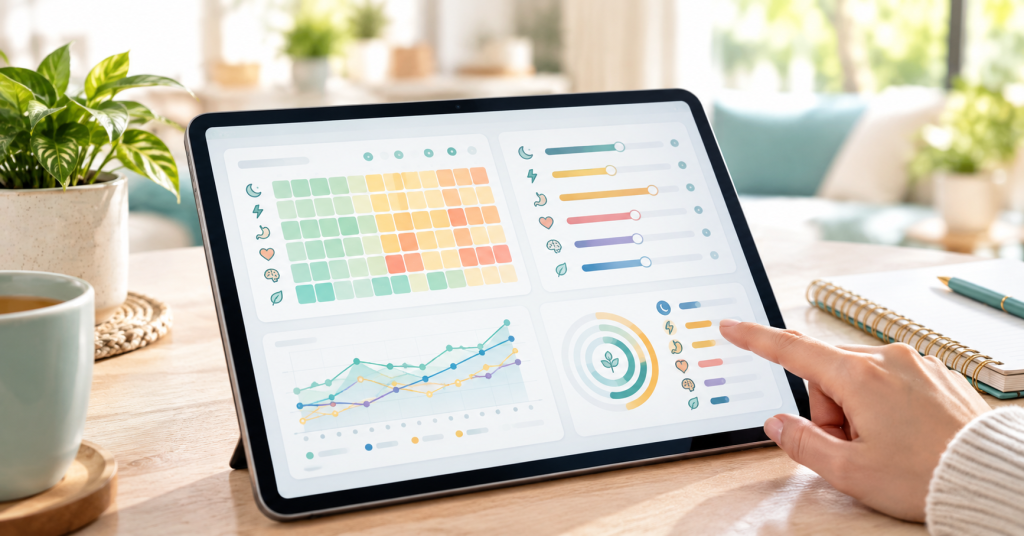
If you want a ready-made tool, the Symptom Pattern Tracker Dashboard is an interactive, browser-based dashboard designed to help you log symptoms, daily habits, and lifestyle factors in one organized place.
What you can track:
- Symptoms such as bloating, fatigue, headaches, joint pain, brain fog, mood changes, digestive discomfort, and skin flare-ups, each with a 1–10 severity score
- Daily factors including sleep, water, fiber, stress, exercise, and caffeine
What is included:
- Interactive Today dashboard and Symptom Log
- Dedicated trackers for sleep, water, fiber, stress, exercise, and caffeine
- A Correlation Insights dashboard with a visual correlation map and Strongest Pattern findings, showing which logged factors appear to move alongside your symptoms
- A 30-day progress tracker and achievement badges to help you stay consistent
- Browser-based private storage, so your entries are saved privately in your browser
Who it may suit: people who want to organize their symptoms and lifestyle habits, spot patterns over time, and walk into appointments with clearer information.
Price: $20, one-time.
Important: This dashboard is a personal pattern-tracking and wellness organization tool. It does not diagnose medical conditions and cannot establish that one factor causes a symptom.
Get the Symptom Pattern Tracker Dashboard here
Tips to Stay Consistent With Tracking
- Tie logging to an existing habit, like brushing your teeth or making evening tea.
- Keep it under two minutes. If logging feels like a chore, simplify.
- Do not aim for perfection. A missed day is fine. Just pick it back up.
- Celebrate streaks. Small wins keep you motivated.
- Review weekly, not daily, so a single bad day does not feel like a trend.
If you would like an organized, interactive way to start, explore the Symptom Pattern Tracker Dashboard and begin building your pattern history today.
About the author: Written by the FitHealthyMind team. Add your author bio, credentials, and a short “reviewed by” line here to strengthen EEAT.
Sources and Further Reading
- NHS: Health A to Z (conditions and long-term health information)
- CDC: Chronic Disease Center
- Mayo Clinic: Diseases and Conditions
These links are general health references. Always rely on your own doctor or GP for advice about your condition.
Symptom Pattern Tracker Dashboard: An Interactive Option
If you want a ready-made tool, the Symptom Pattern Tracker Dashboard is an interactive, browser-based dashboard designed to help you log symptoms, daily habits, and lifestyle factors in one organized place.
What you can track:
- Symptoms such as bloating, fatigue, headaches, joint pain, brain fog, mood changes, digestive discomfort, and skin flare-ups, each with a 1–10 severity score
- Daily factors including sleep, water, fiber, stress, exercise, and caffeine
What is included:
- Interactive Today dashboard and Symptom Log
- Dedicated trackers for sleep, water, fiber, stress, exercise, and caffeine
- A Correlation Insights dashboard with a visual correlation map and Strongest Pattern findings, showing which logged factors appear to move alongside your symptoms
- A 30-day progress tracker and achievement badges to help you stay consistent
- Browser-based private storage, so your entries are saved privately in your browser
Who it may suit: people who want to organize their symptoms and lifestyle habits, spot patterns over time, and walk into appointments with clearer information.
Price: $20, one-time.
Important: This dashboard is a personal pattern-tracking and wellness organization tool. It does not diagnose medical conditions and cannot establish that one factor causes a symptom.
Get the Symptom Pattern Tracker Dashboard here
Tips to Stay Consistent With Tracking
- Tie logging to an existing habit, like brushing your teeth or making evening tea.
- Keep it under two minutes. If logging feels like a chore, simplify.
- Do not aim for perfection. A missed day is fine. Just pick it back up.
- Celebrate streaks. Small wins keep you motivated.
- Review weekly, not daily, so a single bad day does not feel like a trend.
Frequently Asked Questions
What is the best way to track chronic illness symptoms?
The best way is the one you will use consistently. Record your main symptoms with a 1–10 severity score, add a few daily factors like sleep and stress, and log at the same time each day. Whether you use paper, an app, or an interactive dashboard, consistency matters most.
What should I include in a symptom tracker?
Include your key symptoms, severity scores, and daily factors that may be connected, such as sleep, water, stress, exercise, and caffeine. Add notes for unusual events like travel, illness, or medication changes.
Can a symptom tracker diagnose me?
No. A symptom tracker helps you organize information and notice patterns. It cannot diagnose a condition or prove what causes your symptoms. Only a qualified healthcare professional can do that.
How long should I track symptoms before I see patterns?
Many people need at least two to four weeks of consistent logging before patterns become easier to see. Longer tracking generally gives a clearer picture.
Is my data private in a browser-based dashboard?
With the Symptom Pattern Tracker Dashboard, entries are saved privately in your browser. Because data lives in your browser, clearing your browser data or switching devices can affect your records, so keep that in mind.
Should I show my symptom tracker to my doctor or GP?
Yes, if you are comfortable doing so. A clear symptom history can help your healthcare provider understand how you have been feeling over time. Present your findings as observations and let your provider guide any medical decisions.
Final Thoughts
A symptom tracker for chronic illness will not solve everything, but it can give you clarity when symptoms feel unpredictable. By tracking a few symptoms and daily factors consistently, reading your data carefully, and sharing it with your doctor or GP, you turn scattered experiences into useful information.
If you would like an organized, interactive way to start, explore the Symptom Pattern Tracker Dashboard and begin building your pattern history today.
About the author: Written by the FitHealthyMind team. Add your author bio, credentials, and a short “reviewed by” line here to strengthen EEAT.
Sources to add before publishing: link 2–3 trusted references (for example, NHS, Mayo Clinic, or CDC pages on symptom tracking or chronic condition self-management) in the relevant sections.