
Family Wellness Dashboard | Meal Planner & Fitness Tracker
$ 29
Description
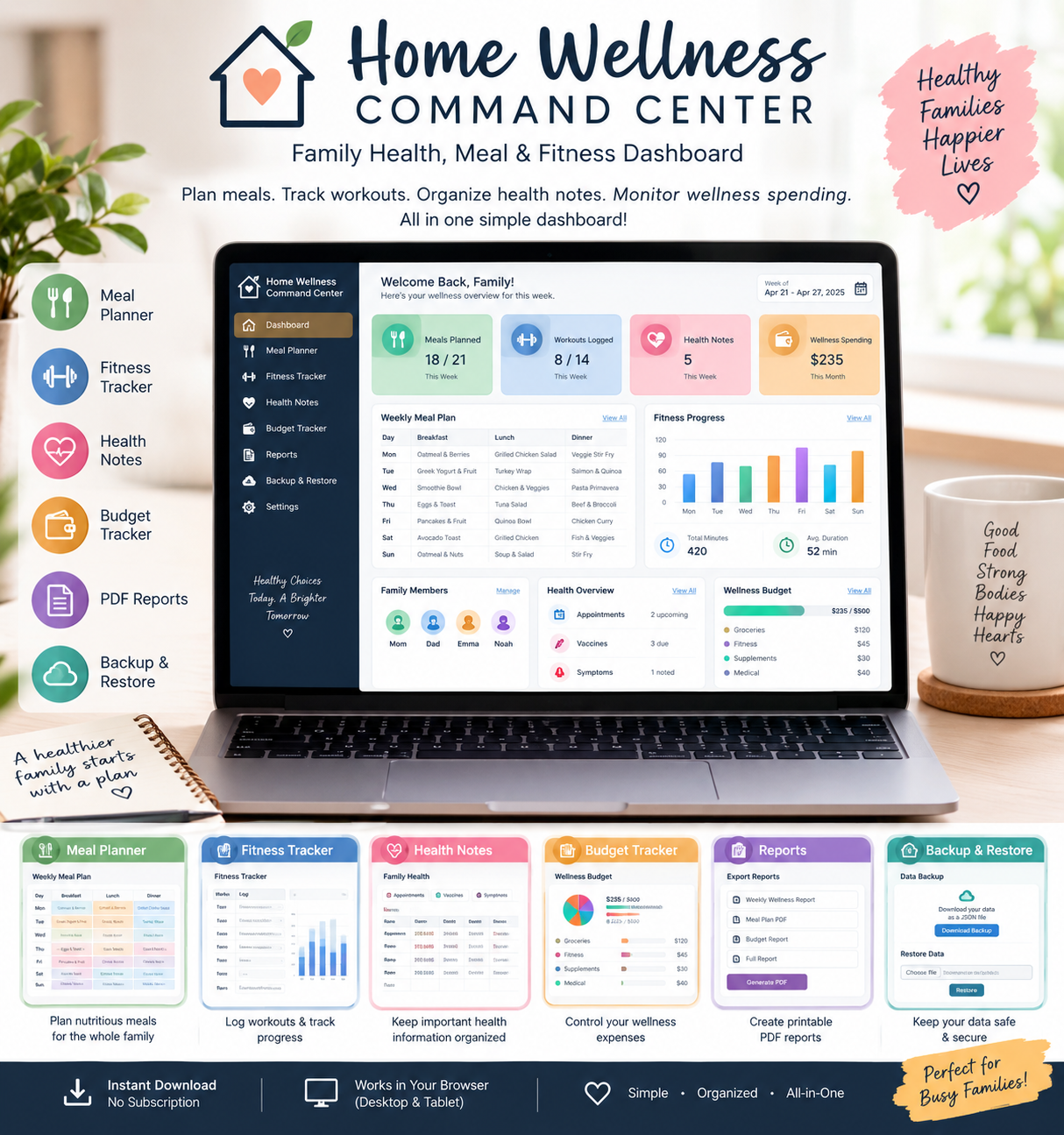
Home Wellness Command Center-Interactive Family Meal , Fitness & Health Dashboard
Home Wellness Command Center is an interactive family wellness dashboard designed to help you organize meals, fitness, family health notes and wellness spending in one convenient place.
Plan breakfast, lunch and dinner for the entire week, log family workouts, keep important health notes, track wellness expenses and monitor your monthly health budget. You can also generate printable PDF reports and back up your dashboard data for safekeeping.
Instead of managing separate planners and spreadsheets, keep your family’s everyday wellness information organized in one simple digital command center.
Instant digital download. No subscription required.
Key Benefits
🥗 Plan Family Meals
Organize breakfast, lunch and dinner for all 7 days in one weekly meal-planning grid.
🏃 Track Family Fitness
Log workouts by family member, activity type and duration, then see weekly activity visually.
❤️ Organize Family Health
Keep appointments, vaccines, symptoms and general health notes organized by household member.
💵 Control Wellness Spending
Set a monthly health budget and track groceries, fitness, supplements, medical expenses and other wellness costs.
📊 See Your Week at a Glance
The overview gives you a quick snapshot of meal planning, fitness, family health activity and budget progress.
📄 Export Your Reports
Create weekly wellness, meal-plan and budget PDFs for easy printing or record keeping.
🔐 Backup Your Information
Download your dashboard data as a JSON backup and restore it later if needed.
How It Works in 3 Easy Steps
Step 1: Download Your HTML File
After purchase, download the digital HTML dashboard file to your computer, tablet, or phone. This is an HTML file, not a PDF document.
Step 2: Open Your Dashboard
On a computer, locate the downloaded .html file and open it with a modern browser such as Google Chrome, Microsoft Edge, or Safari.
On Android, download the file and open it using a compatible browser or file manager. On iPhone or iPad, save the file to the Files app and try opening it in a compatible browser. If your device does not open the file correctly, use a desktop or laptop browser.
Step 3: Organize Your Family Wellness
Use the available dashboard tools to organize meal plans, fitness routines, family wellness habits, and household tasks. Save your entries and create backups regularly if your dashboard supports data export.
Important Data & Backup Warning
Please read before using your dashboard.
This is a digital organizer, not a cloud-based storage service unless specifically stated otherwise.
- Your entries may be stored locally in your browser or device, depending on how the dashboard is built.
- Clearing browser data, deleting website data, using private browsing, changing browsers, or switching devices may cause saved entries to disappear or become inaccessible.
- Browser data is not automatically transferred to a new device.
- If your dashboard includes a JSON Export/Import feature, export a backup regularly and store it somewhere safe, such as a secure folder or cloud drive.
- To restore your information, open the dashboard and use its JSON Import/Restore feature, if available.
- Keep an original backup copy. Do not edit JSON files unless you understand the format.
Important: A JSON backup can protect your entries only if the dashboard actually supports exporting and importing its saved data. Test the backup and restore process with sample entries before relying on it.
Frequently Asked Questions
1. Is this a PDF or an HTML file?
This product is an HTML digital dashboard, not a PDF. It is designed to open in a compatible web browser.
2. How do I download the product?
After purchase, use the provided download link to save the HTML file to your device. The file is downloaded rather than printed like a PDF.
3. Can I open the dashboard on my mobile phone?
You can try opening it on Android or iPhone using a compatible browser. Mobile file-opening behavior varies by device and browser. A desktop or laptop may provide a more reliable experience.
4. How do I use the dashboard?
Download the file, open it in a compatible browser, and use the available sections to organize family meals, fitness routines, and wellness habits.
5. Will my entries remain saved?
That depends on how the dashboard stores data. Locally stored entries may be lost if browser data is cleared or may not appear when you switch devices or browsers. Make regular backups if export is supported.
6. What is a JSON backup?
A JSON backup is a file containing exported data in a structured format. If your dashboard supports JSON export and import, you can use it to back up and restore your entries.
7. What happens if I change my device?
Your entries may not transfer automatically. Before changing devices, export your data if the dashboard supports it. Then use the matching import feature on the new device, if available.
8. Is this a medical tool?
No. This dashboard is an organizational tool for planning and tracking routines. It does not diagnose, treat, or prevent medical conditions and does not replace professional medical advice.
Medical Disclaimer
This product is intended for general organization, wellness planning, meal planning, and fitness habit tracking only. It is not medical advice and is not a substitute for consultation with a qualified healthcare professional. Individual health and nutritional needs vary. Consult a qualified professional before making significant changes to your diet, exercise routine, or healthcare plan.
Feature List
- Interactive Home Wellness Dashboard
- Weekly Meal Planner
- 7-Day Breakfast, Lunch & Dinner Grid
- Family Fitness Tracker
- Workout Duration Tracking
- Weekly Fitness Chart
- Multiple Family Members
- Family Health Notes
- Appointment Tracking
- Vaccine Tracking
- Symptom Notes
- Monthly Wellness Budget
- Expense Tracker
- Spending-by-Category Visualization
- Weekly Wellness Overview
- Printable Meal Plan PDF
- Budget Report PDF
- Full Weekly Wellness Report PDF
- JSON Data Backup
- Backup Restore Function
- Browser-Based Data Storage
- Responsive Layout for Smaller Screens
The dashboard explicitly stores entries locally in the browser, rather than requiring an online account.
Reviews
There are no reviews yet.